# LangChain
Source: https://docs.trysoma.ai/ai-frameworks/langchain
Using LangChain with Soma
Nothing to see here, move along 👀
# OpenAI SDK
Source: https://docs.trysoma.ai/ai-frameworks/openai-sdk
Using OpenAI SDK with Soma
Nothing to see here, move along 👀
# Overview
Source: https://docs.trysoma.ai/ai-frameworks/overview
Using AI frameworks with Soma
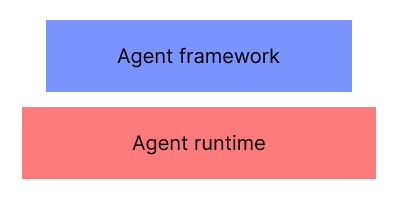 We view Soma as the bottom of the pyramind, providing the core building blocks for your agent and providing a DX to increase developer velocity.
You can use any framework you want to build your agent, including:
* Vercel AI SDK
* Langchain
* OpenAI Agents SDK
Whilst we don't have lower level language bindings for all of these libraries just yet, you can still use them with Soma directly. Soma provides:
* A secure MCP server for your agent to use
* A ready to use OpenAI Streaming and Agent 2 Agent compatible API endpoints to message your agent
* MCP and agent chat debug tools
* An easy path from local development to production
* API credential management (i.e. protect the chat endpoints via API key, Oauth, etc.)
* Human in-the-loop approvals
* Fault tolerance and resumability
all of which compliment your chosen framework and agent / workflow business logic.
# Vercel AI SDK
Source: https://docs.trysoma.ai/ai-frameworks/vercel-ai-sdk
Using Vercel AI SDK with Soma
Nothing to see here, move along 👀
# Get runtime config
Source: https://docs.trysoma.ai/api-reference/_internal/get-runtime-config
api-reference/openapi.json get /_internal/v1/runtime_config
Get the current runtime configuration
# Health check
Source: https://docs.trysoma.ai/api-reference/_internal/health-check
api-reference/openapi.json get /_internal/v1/health
Check the health status of the service and SDK server connectivity
# Trigger codegen
Source: https://docs.trysoma.ai/api-reference/_internal/trigger-codegen
api-reference/openapi.json post /_internal/v1/trigger_codegen
Trigger code generation for the SDK
# Get agent card
Source: https://docs.trysoma.ai/api-reference/a2a/get-agent-card
api-reference/openapi.json get /api/a2a/v1/.well-known/agent.json
Get the agent card describing agent capabilities and metadata
# Get agent definition
Source: https://docs.trysoma.ai/api-reference/a2a/get-agent-definition
api-reference/openapi.json get /api/a2a/v1/definition
Get the agent definition (capabilities and metadata)
# Get extended agent card
Source: https://docs.trysoma.ai/api-reference/a2a/get-extended-agent-card
api-reference/openapi.json get /api/a2a/v1/agent/authenticatedExtendedCard
Get the authenticated extended agent card with additional metadata
# Handle JSON-RPC
Source: https://docs.trysoma.ai/api-reference/a2a/handle-json-rpc
api-reference/openapi.json post /api/a2a/v1
Handle JSON-RPC requests for agent-to-agent communication (tasks, messages, etc.)
# Create provider
Source: https://docs.trysoma.ai/api-reference/bridge/create-provider
api-reference/openapi.json post /api/bridge/v1/available-providers/{provider_controller_type_id}/available-credentials/{credential_controller_type_id}
Create a new provider instance with the specified configuration
# Create resource server credential
Source: https://docs.trysoma.ai/api-reference/bridge/create-resource-server-credential
api-reference/openapi.json post /api/bridge/v1/available-providers/{provider_controller_type_id}/available-credentials/{credential_controller_type_id}/credential/resource-server
Create a new resource server credential
# Create user credential
Source: https://docs.trysoma.ai/api-reference/bridge/create-user-credential
api-reference/openapi.json post /api/bridge/v1/available-providers/{provider_controller_type_id}/available-credentials/{credential_controller_type_id}/credential/user-credential
Create a new user credential
# Delete provider
Source: https://docs.trysoma.ai/api-reference/bridge/delete-provider
api-reference/openapi.json delete /api/bridge/v1/provider/{provider_instance_id}
Delete a provider instance by its unique identifier
# Disable function
Source: https://docs.trysoma.ai/api-reference/bridge/disable-function
api-reference/openapi.json post /api/bridge/v1/provider/{provider_instance_id}/function/{function_controller_type_id}/disable
Disable a function for a provider instance
# Enable function
Source: https://docs.trysoma.ai/api-reference/bridge/enable-function
api-reference/openapi.json post /api/bridge/v1/provider/{provider_instance_id}/function/{function_controller_type_id}/enable
Enable a function for a provider instance
# Encrypt resource server config
Source: https://docs.trysoma.ai/api-reference/bridge/encrypt-resource-server-config
api-reference/openapi.json post /api/bridge/v1/available-providers/{provider_controller_type_id}/available-credentials/{credential_controller_type_id}/credential/resource-server/encrypt
Encrypt a resource server credential configuration before storage
# Encrypt user credential config
Source: https://docs.trysoma.ai/api-reference/bridge/encrypt-user-credential-config
api-reference/openapi.json post /api/bridge/v1/available-providers/{provider_controller_type_id}/available-credentials/{credential_controller_type_id}/credential/user-credential/encrypt
Encrypt a user credential configuration before storage
# Get function OpenAPI spec
Source: https://docs.trysoma.ai/api-reference/bridge/get-function-openapi-spec
api-reference/openapi.json get /api/bridge/v1/function-instances/openapi.json
Get the OpenAPI specification for all function instances
# Get provider
Source: https://docs.trysoma.ai/api-reference/bridge/get-provider
api-reference/openapi.json get /api/bridge/v1/provider/{provider_instance_id}
Retrieve a provider instance by its unique identifier
# Invoke function
Source: https://docs.trysoma.ai/api-reference/bridge/invoke-function
api-reference/openapi.json post /api/bridge/v1/provider/{provider_instance_id}/function/{function_controller_type_id}/invoke
Invoke a function on a provider instance
# List function instances
Source: https://docs.trysoma.ai/api-reference/bridge/list-function-instances
api-reference/openapi.json get /api/bridge/v1/function-instances
List all function instances with optional filtering by provider instance
# List provider instances
Source: https://docs.trysoma.ai/api-reference/bridge/list-provider-instances
api-reference/openapi.json get /api/bridge/v1/provider
List all provider instances with optional filtering by status and provider type
# List providers
Source: https://docs.trysoma.ai/api-reference/bridge/list-providers
api-reference/openapi.json get /api/bridge/v1/available-providers
List all available provider types that can be instantiated
# List providers by function
Source: https://docs.trysoma.ai/api-reference/bridge/list-providers-by-function
api-reference/openapi.json get /api/bridge/v1/provider/grouped-by-function
List provider instances grouped by their associated functions
# MCP SSE connection
Source: https://docs.trysoma.ai/api-reference/bridge/mcp-sse-connection
api-reference/openapi.json get /api/bridge/v1/mcp
Establish Server-Sent Events (SSE) connection for MCP protocol communication
# OAuth callback
Source: https://docs.trysoma.ai/api-reference/bridge/oauth-callback
api-reference/openapi.json get /api/bridge/v1/generic-oauth-callback
Handle OAuth callback to complete user credential brokering flow
# Send MCP message
Source: https://docs.trysoma.ai/api-reference/bridge/send-mcp-message
api-reference/openapi.json post /api/bridge/v1/mcp
Send a JSON-RPC message to the MCP server
# Start credential brokering
Source: https://docs.trysoma.ai/api-reference/bridge/start-credential-brokering
api-reference/openapi.json post /api/bridge/v1/available-providers/{provider_controller_type_id}/available-credentials/{credential_controller_type_id}/credential/user-credential/broker
Start the OAuth flow for user credential brokering
# Update provider
Source: https://docs.trysoma.ai/api-reference/bridge/update-provider
api-reference/openapi.json patch /api/bridge/v1/provider/{provider_instance_id}
Update an existing provider instance configuration
# Create data key
Source: https://docs.trysoma.ai/api-reference/encryption/create-data-key
api-reference/openapi.json post /api/encryption/v1/envelope/{envelope_id}/dek
Create a new data encryption key (DEK) encrypted with the specified envelope encryption key
# Create DEK alias
Source: https://docs.trysoma.ai/api-reference/encryption/create-dek-alias
api-reference/openapi.json post /api/encryption/v1/dek/alias
Create an alias for a data encryption key to enable lookup by friendly name
# Create envelope key
Source: https://docs.trysoma.ai/api-reference/encryption/create-envelope-key
api-reference/openapi.json post /api/encryption/v1/envelope
Create a new envelope encryption key (master key) for encrypting data encryption keys
# Delete DEK alias
Source: https://docs.trysoma.ai/api-reference/encryption/delete-dek-alias
api-reference/openapi.json delete /api/encryption/v1/dek/alias/{alias}
Delete an alias for a data encryption key
# Get DEK by alias
Source: https://docs.trysoma.ai/api-reference/encryption/get-dek-by-alias
api-reference/openapi.json get /api/encryption/v1/dek/alias/{alias}
Retrieve a data encryption key by its alias or ID
# Import data key
Source: https://docs.trysoma.ai/api-reference/encryption/import-data-key
api-reference/openapi.json post /api/encryption/v1/envelope/{envelope_id}/dek/import
Import an existing pre-encrypted data encryption key into the system
# List data keys
Source: https://docs.trysoma.ai/api-reference/encryption/list-data-keys
api-reference/openapi.json get /api/encryption/v1/envelope/{envelope_id}/dek
List all data encryption keys encrypted with the specified envelope encryption key
# List envelope keys
Source: https://docs.trysoma.ai/api-reference/encryption/list-envelope-keys
api-reference/openapi.json get /api/encryption/v1/envelope
List all envelope encryption keys (master keys) with pagination
# Migrate all data keys
Source: https://docs.trysoma.ai/api-reference/encryption/migrate-all-data-keys
api-reference/openapi.json post /api/encryption/v1/envelope/{envelope_id}/migrate
Migrate all data encryption keys encrypted with the specified envelope key to a new envelope key
# Migrate data key
Source: https://docs.trysoma.ai/api-reference/encryption/migrate-data-key
api-reference/openapi.json post /api/encryption/v1/envelope/{envelope_id}/dek/{dek_id}/migrate
Migrate a data encryption key to be encrypted with a different envelope encryption key
# Update DEK alias
Source: https://docs.trysoma.ai/api-reference/encryption/update-dek-alias
api-reference/openapi.json put /api/encryption/v1/dek/alias/{alias}
Update the alias for a data encryption key
# Create secret
Source: https://docs.trysoma.ai/api-reference/secret/create-secret
api-reference/openapi.json post /api/secret/v1
Create a new encrypted secret with the specified key and value
# Delete secret
Source: https://docs.trysoma.ai/api-reference/secret/delete-secret
api-reference/openapi.json delete /api/secret/v1/{secret_id}
Delete a secret by its unique identifier
# Get secret
Source: https://docs.trysoma.ai/api-reference/secret/get-secret
api-reference/openapi.json get /api/secret/v1/{secret_id}
Retrieve a secret by its unique identifier
# Get secret by key
Source: https://docs.trysoma.ai/api-reference/secret/get-secret-by-key
api-reference/openapi.json get /api/secret/v1/key/{key}
Retrieve a secret by its key name
# Import secret
Source: https://docs.trysoma.ai/api-reference/secret/import-secret
api-reference/openapi.json post /api/secret/v1/import
Import an existing pre-encrypted secret into the system
# List decrypted secrets
Source: https://docs.trysoma.ai/api-reference/secret/list-decrypted-secrets
api-reference/openapi.json get /api/secret/v1/list-decrypted
List all secrets with decrypted values (requires decryption access)
# List secrets
Source: https://docs.trysoma.ai/api-reference/secret/list-secrets
api-reference/openapi.json get /api/secret/v1
List all secrets with pagination (values are encrypted)
# Update secret
Source: https://docs.trysoma.ai/api-reference/secret/update-secret
api-reference/openapi.json put /api/secret/v1/{secret_id}
Update an existing secret's value or metadata
# Get task
Source: https://docs.trysoma.ai/api-reference/task/get-task
api-reference/openapi.json get /api/task/v1/{task_id}
Retrieve a task by its unique identifier
# Get task timeline
Source: https://docs.trysoma.ai/api-reference/task/get-task-timeline
api-reference/openapi.json get /api/task/v1/{task_id}/timeline
Get the timeline history of a task with pagination
# List contexts
Source: https://docs.trysoma.ai/api-reference/task/list-contexts
api-reference/openapi.json get /api/task/v1/context
List all unique task contexts with pagination
# List tasks
Source: https://docs.trysoma.ai/api-reference/task/list-tasks
api-reference/openapi.json get /api/task/v1
List all tasks with pagination
# List tasks by context
Source: https://docs.trysoma.ai/api-reference/task/list-tasks-by-context
api-reference/openapi.json get /api/task/v1/context/{context_id}/task
List all tasks for a specific context ID with pagination
# Send message
Source: https://docs.trysoma.ai/api-reference/task/send-message
api-reference/openapi.json post /api/task/v1/{task_id}/message
Send a message to a task
# Update task status
Source: https://docs.trysoma.ai/api-reference/task/update-task-status
api-reference/openapi.json put /api/task/v1/{task_id}
Update the status of a task
# Chat Agent
Source: https://docs.trysoma.ai/common-patterns/chat-agent
Building chat-based agents with Soma
Nothing to see here, move along 👀 This is an example: [example agent template](https://github.com/trysoma/typescript-ai-sdk-template/blob/main/agents/index.ts)
# Combined Agent
Source: https://docs.trysoma.ai/common-patterns/combined-agent
Building agents that combine chat and workflow patterns
Nothing to see here, move along 👀 This is an example: [example agent template](https://github.com/trysoma/typescript-ai-sdk-template/blob/main/agents/index.ts)
# Workflow Agent
Source: https://docs.trysoma.ai/common-patterns/workflow-agent
Building workflow-based agents with Soma
Nothing to see here, move along 👀 This is an example: [example agent template](https://github.com/trysoma/typescript-ai-sdk-template/blob/main/agents/index.ts)
# Deployment
Source: https://docs.trysoma.ai/deployment
Going from local to cloud
This section is a work in progress. Typical deployment pattern is:
1. Have a Dockerfile that installs the soma binary using our install script or base image.
2. Install your SDK system specific dependencies (e.g. Node.js, Python, etc.)
3. Install your SDK project dependencies (e.g. pnpm install)
4. Build your SDK project (e.g. pnpm build)
5. Set the entrypoint command to `soma start`
6. Using your container host platform, set any environment variables required
7. Let soma.yaml manage your production secrets and MCP provider credentials
8. Ensure your container has access to the AWS KMS key used to encrypt your secrets and MCP provider credentials
## Production dependencies
Soma embeds these dependencies into the binary for ease of use. It's advised that you follow best practice for self-hosting these tools in a production setting or opt for their cloud managed services.
You can configure credentials for Turso and Restate as parameter options to the soma start command. `soma start --db-conn-string xxx --db-auth-token xxx --restate-admin-url xxx --restate-ingress-url xxx --restate-admin-token xxx `
### Turso / Sqlite
### Restate
# Crash Recovery
Source: https://docs.trysoma.ai/fault-tolerance/crash-recovery
Recovering from crashes
Nothing to see here, move along 👀
# Resumability
Source: https://docs.trysoma.ai/fault-tolerance/resumability
Resuming agent execution
Nothing to see here, move along 👀
# Things to Watch Out For
Source: https://docs.trysoma.ai/fault-tolerance/things-to-watch-out-for
Common pitfalls and things to watch out for
Nothing to see here, move along 👀
# Introduction
Source: https://docs.trysoma.ai/index
Welcome to Soma
## Setting up
TLDR; Jump straight into building your first agent in minutes.
Follow our quickstart guide.
## Introduction
Soma is an open-source, self-hostable AI agent & workflow runtime designed for startups through to enterprise. It's self-hostable, a single binary and provides a security and governance plane across your agents.
You can use Soma to build many different types of workflows & agents, using plain old code. You can build:
* Chat / Turn based agents (see [example agent template](https://github.com/trysoma/typescript-ai-sdk-template/blob/main/agents/index.ts))
* Business process-style workflows (see [example agent template](https://github.com/trysoma/typescript-ai-sdk-template/blob/main/agents/index.ts))
* A combination of both (see [example agent template](https://github.com/trysoma/typescript-ai-sdk-template/blob/main/agents/index.ts))
See the quickstart guide for more details.
Key features include:
* Define your custom MCP functions and AI agents in regular code (Typescript supported, Python coming soon)
* Bring whichever tools and supporting frameworks you would like into Soma (e.g. Llangchain, Vercel AI SDK, etc.)
* Make your code fault-tolerant and resumable. Crash or suspend execution at any point and resume from where it left off
* Automatically get an A2A (Agent2Agent) and (coming soon) OpenAI Streaming compatable API endpoints to message your agent
* An MCP server pre-integrated with well known third-party SaaS providers that handles credential encryption and rotation for you
* A UI to debug your Agent & MCP functions, configure MCP provider credentials and see historical agent executions and chats
* Deployable to local desktop or cloud environments
Features that are landing soon:
* Fine-grained API key access management to restrict access to your agent
* Human in-the-loop approvals before actions are executed
* Outbound AI gateway to intercept all agent requests to model providers for deeper observability
This is all packaged into a single binary and leverages:
* [Resstate](https://resstate.dev) for fault-tolerance
* [Turso](https://turso.tech) (Sqlite) for data storage requirements
* Local, AWS or (soon)GCP KMS encryption for secrets management (MCP credentials, API keys, Agent secrets)
See our deployment guide for self-hosting instructions.
## Framework vs runtime
We view Soma as the bottom of the pyramind, providing the core building blocks for your agent and providing a DX to increase developer velocity.
You can use any framework you want to build your agent, including:
* Vercel AI SDK
* Langchain
* OpenAI Agents SDK
Whilst we don't have lower level language bindings for all of these libraries just yet, you can still use them with Soma directly. Soma provides:
* A secure MCP server for your agent to use
* A ready to use OpenAI Streaming and Agent 2 Agent compatible API endpoints to message your agent
* MCP and agent chat debug tools
* An easy path from local development to production
* API credential management (i.e. protect the chat endpoints via API key, Oauth, etc.)
* Human in-the-loop approvals
* Fault tolerance and resumability
all of which compliment your chosen framework and agent / workflow business logic.
## SDK support matrix
| Language | Platform | Status |
| ---------- | --------------------- | ------ |
| Typescript | Mac OSX X86 | 🟢 |
| | Mac OSX AARCH / ARM | 🟢 |
| | Linux GNU X86 | 🟢 |
| | Linux GNU AARCH / ARM | 🟢 |
| | Windows | ⚪ |
| Python | Mac OSX X86 | 🟢 |
| | Mac OSX AARCH / ARM | 🟢 |
| | Linux GNU X86 | 🟢 |
| | Linux GNU AARCH / ARM | 🟢 |
| | Windows | ⚪ |
| Rust | Mac OSX X86 | ⚪ |
| | Mac OSX AARCH / ARM | ⚪ |
| | Linux GNU X86 | ⚪ |
| | Linux GNU AARCH / ARM | ⚪ |
| | Windows | ⚪ |
Windows support is planned however it's not natively supported due to our use of Unix domain sockets in Rust ( [related issue](https://github.com/openai/codex/pull/5350) )
Get started and run your first agent in minutes
# Via Agent 2 Agent Endpoint
Source: https://docs.trysoma.ai/invoking-your-agent/via-agent-2-agent-endpoint
Invoking your agent via the A2A endpoint
Nothing to see here, move along 👀
# Via OpenAI Streaming Endpoint
Source: https://docs.trysoma.ai/invoking-your-agent/via-openai-streaming-endpoint
Invoking your agent via the OpenAI streaming endpoint
Nothing to see here, move along 👀
# Adding Custom Functions
Source: https://docs.trysoma.ai/mcp-functions/adding-custom-functions
Adding custom MCP functions to your agent
Nothing to see here, move along 👀
# Overview
Source: https://docs.trysoma.ai/mcp-functions/overview
Introduction to secure MCP functions
Soma ships with a high-performance, secure MCP server called Bridge.
Bridge can be used in 2 ways:
* As an MCP server you can give to your agent
* As a standard REST API endpoint that you can invoke directly from your workflow
For example, you can configure your agent, via your SDK of choice, to use Bridge as an MCP server:
```typescript theme={null}
import { SSEClientTransport } from '@modelcontextprotocol/sdk/client/sse';
const mcpClient = await createMCPClient({
transport: {
type: 'http',
// this is automatically injected by the Soma API server
url: process.env.SOMA_BRIDGE_MCP_URL,
headers: {
// this is automatically injected by the Soma API server
'X-Api-Key': process.env.SOMA_AGENT_API_KEY,
// this is automatically injected by the Soma API server
'Authorization': `Bearer ${process.env.SOMA_USER_ACCESS_TOKEN}`,
},
}
})
const tools = await mcpClient.tools();
const response = await generateText({
model: 'openai/gpt-4o',
tools,
stopWhen: stepCountIs(5),
messages: [
{
role: 'user',
content: [{ type: 'text', text: 'Find products under $100' }],
},
],
});
```
Read the [Vercel AI SDK documentation](https://ai-sdk.dev/cookbook/node/mcp-tools) for more details.
```python theme={null}
from langchain_mcp_adapters.client import MultiServerMCPClient
from langchain.agents import create_openai_tools_agent
import os
client = MultiServerMCPClient(
{
"soma": {
"transport": "http",
# this is automatically injected by the Soma API server
"url": os.getenv("SOMA_BRIDGE_MCP_URL"),
"headers": {
# this is automatically injected by the Soma API server
"X-Api-Key": os.getenv("SOMA_AGENT_API_KEY"),
# this is automatically injected by the Soma API server
"Authorization": `Bearer ${os.getenv("SOMA_USER_ACCESS_TOKEN")}`,
},
}
}
)
tools = await client.get_tools()
agent = create_agent(
"claude-sonnet-4-5-20250929",
tools
)
```
Read the [Langchain documentation](https://docs.langchain.com/oss/python/langchain/mcp) for more details.
Alternatively, you can invoke Bridge directly from your code, as if it were a standard REST API client.
```typescript theme={null}
import { type BridgeDefinition, getBridge } from "../soma/bridge";
// No need to pass in any credentials, they are automatically injected by the Soma API server
const bridge = getBridge(ctx);
const res = await bridge.gmailUser.sendEmail({
to: "test@example.com",
subject: "Test email",
body: "This is a test email",
});
```
```python theme={null}
from soma.bridge import Bridge, get_bridge
# Get bridge instance
# No need to pass in any credentials, they are automatically injected by the Soma API server
bridge = get_bridge(params.ctx)
await bridge.gmail_user.send_email(
to="test@example.com",
subject="Test email",
body="This is a test email",
)
```
To understand more about about MCP functions, please read:
* [Using built-in SaaS MCP functions](./available-saas-mcp-functions.mdx)
* [Adding custom MCP functions](./adding-custom-functions.mdx)
* [Managing MCP function credentials](./managing-mcp-function-credentials.mdx)
* [Understanding MCP server authentication](./understanding-mcp-server-authentication.mdx)
# Quickstart
Source: https://docs.trysoma.ai/quickstart
Get started locally in minutes
## Installation
```bash theme={null}
curl -sSL https://trysoma.ai/install.sh | sh
```
The soma init command will create a new project from one of our git templates. Run `soma init` to see all available options.
```bash theme={null}
soma init --template typescript-ai-sdk hello-world-agent
cd hello-world-agent
# install dependencies. You can use any package manager you want.
pnpm install
# start the dev server
soma dev --clean
```
```bash theme={null}
soma init --template python-langchain-template hello-world-agent
cd hello-world-agent
# install dependencies. You can use any package manager you want.
uv sync
# start the dev server
soma dev --clean
```
Please run all the remaining commands in a separate terminal whilst the dev server is running.
An encryption key is necessary to keep secrets, MCP credentials and sensitive auth middleware configuration safe.
```bash theme={null}
soma enc-key add local --file-name master.bin
```
Local encryption keys will be added to the `.soma/envelope-encryption-keys/$filename` file. Local keys are useful for development and testing. However if you intend to share this project or deploy it, we advise using AWS KMS or storing the local key as a CI secret and injecting it before running soma commads.
You can migrate your encrypted data between different key types by using the `soma enc-key migrate` command.
Never commit the `.soma/envelope-encryption-keys` folder to version control.
```bash theme={null}
soma enc-key add aws --arn arn:aws:kms:eu-west-2:xxx:key/xxx --region eu-west-2
```
You will need to ensure your current terminal session has the required AWS environment variables set to access the KMS key. These are normally:
* `AWS_ACCESS_KEY_ID`,
* `AWS_SECRET_ACCESS_KEY`,
* `AWS_SESSION_TOKEN` or,
* `AWS_PROFILE`
```bash theme={null}
soma secret set OPENAI_API_KEY xxx
```
Our example agent uses OpenAI to generate responses.
Open your browser to [http://localhost:3000](http://localhost:3000).
Navigate to the "**Agent 2 Agent**" > "**Chat**".
Send a message to your agent and wait for the response.
Open your browser to [http://localhost:3000](http://localhost:3000).
Navigate to the "**Bridge MCP functions**" > "**Enable functions**".
From here, you can see a list of pre-build Bridge MCP functions, mainly for integrating with third-party SaaS providers. Additionally, you should also see any provider from your project's functions folder which you can now configure and enable.
## Next steps
Learn about our file based project structure and configuration options
Learn about enabling secure MCP functions for your agent
How to build chat, workflow or a combination of both agents
# Google
Source: https://docs.trysoma.ai/secure-saas-mcp-integrations/google
Integrating with Google services
Nothing to see here, move along 👀
# Stripe
Source: https://docs.trysoma.ai/secure-saas-mcp-integrations/stripe
Integrating with Stripe
Nothing to see here, move along 👀
# Agent vs API server isolation
Source: https://docs.trysoma.ai/security/agent-vs-api-server-isolation
How Soma implements process isolation for your agent
There are 2 distinct processes in Soma:
* API server - Responsible for serving the Soma UI, API endpoints, data & control planes
* agent runtime server - A local running GRPC server that runs your agent code and any custom MCP functions you have defined
In order to prevent any secrets, and environment variables from leaking into the agent runtime server, we have implemented process isolation.
This means that the agent runtime server is run in a separate process from the API server.
No environment variables or secrets from the API server are accessible to the agent runtime server unless you explicitly pass them through.
Read about [environment variables](./environment-variables.mdx) and [secrets](./secrets.mdx) for details on how to manage them.
# API Keys & service accounts
Source: https://docs.trysoma.ai/security/api-keys-and-service-accounts
How to manage API keys & service accounts
API keys are the defacto way to authenticate service accounts to invoke agents or other API endpoints in Soma. In fact, Soma uses API keys internally to allow agens access to Soma's API's from inside it's own runtime.
You can manage API keys via the following commands:
`soma api-key add `
`soma api-key rm `
`soma api-key list`
API keys are stored, hashed in the database and are never stored in plaintext. They are also stored hash *and encrypted* in the soma.yaml file in order to allow you to safely commit your soma.yaml file to version control.
Creating an API key will result in creating a *machine* (service account) user in Soma DB and you will be prompted for a role to assign this user.
You can review the available roles and permissions [here](./appendix-roles-and-permissions) to determine the appropriate role for your use case.
## API keys vs Access tokens
It's best to view access tokens & API keys as proof of identity and interchangeable. They both prove different forms of identity humans (users) or machines (service accounts).
Importantly, the roles associated with the access token or API key is ultimately what determines permissions and access to resources.
It's therefore possible to configure API key's or access tokens to invoke agents or any other API endpoints in Soma.
## Requests on behalf of a user
When machines (service accounts) make requests on behalf of a user it's best practice to supply both the API token header (`X-Api-Key`) as well as the access token Authorization header (`Authorization: Bearer `).
For example:
* if you are proxying requests through your own backend or,
* if agents process user requests that result in invoking other agents or Soma API endpoitns
you should supply both the API key and access token.
Why? Providing both for security context means that you can secure Soma resources with the following base rules:
* Only service accounts can access this resource
* Only users can access this resource
* Only service accounts on behalf of a user with the appropriate role can access this resource
# Appendix: roles & permissions
Source: https://docs.trysoma.ai/security/appendix-roles-and-permissions
A catalog of all available roles & related permissions in Soma
This page is still being built and will be available in a future release.
# Appendix: The Role of soma.yaml
Source: https://docs.trysoma.ai/security/appendix-the-role-of-soma-yaml
How the soma.yaml file works
The `soma.yaml` file was initially designed around a desired DX:
1. Developers configure MCP integrations at development time
2. These integrations often require secrets such as refresh tokens, access tokens, API Keys, client secrets, etc.
3. Developers want to test these configurations locally first, many of them require an initial handshake process (e.g. OAuth2 Authorization Code Flow)
4. Once configured locally, we store the encrypted values in the `soma.yaml` file
5. When you deploy your agent to an environment, you configure encryption key access in the environment and on start, these secrets are syned into the environment database and cached in memory (all encrypted).
6. Now your agent "Just Works" (TM) in production.
This was namely a design choice to allow developers to configure Oauth MCP function credentials and enable testing them at development time. These credentials are then encrypted and stored locally and can be safely committed to version control.
# Configuring access control
Source: https://docs.trysoma.ai/security/configuring-access-control
How to configure fine-grained access control to agents, functions & API endpoints
Access control is a core feature of Soma. It allows you to configure fine-grained access control to agents, functions & API endpoints.
Please review the [appendix: roles & permissions](./appendix-roles-and-permissions) for a catalog of all available roles & related permissions in Soma.
In summary, there are the following roles:
* `admin`
* `maintainer`
* `read-only maintainer`
* `user`
* `agent`
When creating an API key, you will explicitly associate a role with the API key. This role will determine the permissions of the API key.
When creating a user, you will define a mapping from a user group to a role or a scope in their access token to a role. In the case of a user group, when a user is added or removed from a specific group, their role will be updated accordingly.
A user can only have one role at a time, the highest role in the hierarchy will be used.
## Agent invocation endpoints
In addition to the above roles which govern access to Soma API endpoints, you can also provide an additional configuration for agent invocation endpoints.
By default, agent's can not be invoked by any role. When configuring your agent in the relevant SDK using `createSomaAgent` or `create_soma_agent`, you can specify an array of all roles that are allowed to invoke the agent.
This enables:
* Agent-only access, where users' can't invoke a workflow. Only agent role users can (other agents).
* User-only access, where agents can't invoke a workflow. Only user role users can (other users).
* Maintainer-only access, where users can't invoke a workflow. Only maintainer role users can (other maintainers).
# Configuring an external identity provider
Source: https://docs.trysoma.ai/security/configuring-an-external-identity-provider
Authenticate users with your identity provider
Soma supports authenticating users and service accounts with 3 different methods. Authentication is generally used to secure 3 different types of access patterns:
1. Agents invoking the Soma API's securely
2. Users & agents invoking other agents
3. Users accessing the Soma admin UI and related endpoints
The main reason for configuring an external identity provider is mainly to secure user access patterns to invoking agents or accessing the Soma admin UI. You can configure multiple identity providers for your application.
All authentication methods for users will results in issuing an access token & refresh token in the response body as well as set the `soma_access_token` & `soma_refresh_token` cookies.
This page covers how to configure an external identity provider for user access. Plrease read the following pages for more information about:
* [Synchronizing users, groups & roles into Soma](./synchronizing-users-groups-and-roles)
* [Configuring fine-grained access control to API endpoints](./configuring-fine-grained-access-control)
* [API Keys & service accounts](./api-keys-and-service-accounts)
Normally we'd recommend setting cookies as HTTP-only, secure and same-site. However, because we are also returning these tokens in the response body, we've opted to loosen the security requirements for these cookies in favour of more flexibility.
## Configuring an external identity provider
You can make use of the following commands to manage your external identity providers:
`soma auth add oidc `
`soma auth add oauth `
`soma auth rm`
`soma auth list`
The add methods will prompt you for OIDC / Oauth Authorization Code Flow configuration details, including:
* Client ID
* Client Secret
* Redirect URI
* Scopes
* Token Endpoint
* User Info Endpoint
* Issuer URL
* JWKS URL
And optionally ask if you would like to configure a way to map scopes, groups to Soma roles & groups. More on that below.
Once configured, you can trigger the authentication flow by navigating to the following URL: `$SOMA_API_URL/api/identity/v1/auth/authorize/$id` where `$id` is the ID of the configured provider you specified during the add command.
The callback URL will return `access_token`, `refresh_token`, `expires_in` in the response body as well as setting `soma_access_token` & `soma_refresh_token` cookie which will allow Soma admin UI access (if the user has the correct role).
### OIDC (OpenID Connect)
OIDC is a standard for authentication that is supported by most modern identity providers. It is a layer of abstraction on top of OAuth 2.0 and is designed to be simpler and more flexible.
Configuring an OIDC provider is preffered over Oauth2.0 as we can sync more identity information from the provider, including the user's email address, groups, etc.
This [resource](https://auth0.com/docs/authenticate/protocols/openid-connect-protocol) provides more information about OIDC.
### Oauth2.0
Oauth2.0 is a standard for authentication that is supported by most modern identity providers. It is a more complex standard than OIDC and is designed to be more flexible.
Soma specifically supports the Authorization Code Flow for Oauth2.0 with optional PKCE support **only**.
This [resource](https://auth0.com/docs/authenticate/protocols/oauth) provides more information about Oauth2.0.
### Saml2.0
Saml2.0 is not currently supported by Soma. Open an issue if you would like to see this feature added.
### STS (Security Token Service)
Soma has a custom STS endpoint which you can invoke in order to swap an external identity provider's access token for a Soma access token & refresh token.
STS can be used to swap OIDC or Oauth2.0 access tokens for a Soma access token & refresh token. The configuration process is very similar to configuring an external identity provider, with the exception that you can specify if the incoming token to validate and swap is present as a request header or cookie.
`soma sts add from-template` will prompt you for the configuration details for the STS endpoint. Once configured, you can invoke the STS endpoint by navigating to the following URL: `$SOMA_API_URL/api/identity/v1/sts/$id` where `$id` is the ID of the configured STS provider you specified during the add command.
# Environment variables
Source: https://docs.trysoma.ai/security/environment-variables
Managing environment variables for your agent
You can use the `soma env` subcommand to manage environment variables for your agents. These environment variables are accessible to the AI agent server.
You can manage these environment variables via the soma CLI whilst the dev server is running (`some dev` in another terminal).
If you would like to dynamically pass through an environment variable from the Soma API server process to the AI agent server, set the variable's value to start with a `$`.
The available commands are:
`soma env set `
`soma env rm `
`soma env list`
# Overview
Source: https://docs.trysoma.ai/security/overview
Overview of security features in Soma
Soma aims to implement enterprise-level security features out of the box. When protecting agents, MCP / function calling, and API endpoints, there are a number of considerations which are summarized below. Please use the links provided for further reading.
## Environment & process security
* [Agent vs API server isolation](./agent-vs-api-server-isolation)
* [Environment variables](./environment-variables)
* [Secrets](./secrets)
* [Encrypting sensitive data](./encrypting-sensitive-data)
* [Role of `soma.yaml`](./the-role-of-soma-yaml)
## MCP function security
* [Bridge MCP provider credential encryption](./../mcp-functions/managing-mcp-function-credentials)
* [Understanding Bridge MCP server authentication](./../mcp-functions/understanding-mcp-server-authentication)
* [Preventing credential leaks to agents](./../mcp-functions/preventing-credential-leaks-to-agents)
## API server security
* [Configuring an external identity provider](./configuring-an-external-identity-provider)
* [Synchronizing users, groups & roles](./user-and-group-provisioning)
* [Configuring fine-grained access control to API endpoints](./configuring-access-control)
* [All available roles & permissions](./appendix-roles-and-permissions)
# Secrets
Source: https://docs.trysoma.ai/security/secrets
Managing secrets for your agent
Because we built an encryption engine around our desired DX, we've expanded it's usage to include general purpose secret management for your agent. These secrets are managed in the same way as MCP provider credentials and are encrypted and decrypted on the fly.
You can manage these secrets via the soma CLI whilst the dev server is running (`some dev` in another terminal).
The available commands are:
`soma secret set `
`soma secret rm `
`soma secret list`
# User & group provisioning
Source: https://docs.trysoma.ai/security/user-and-group-provisioning
How to provision users & groups into Soma
Users and groups play an important role in Soma's security & application model. Users provide the following functionality:
* Ability to invoke agents & workflows
* Ability to access the Soma admin UI
A user's functionality is ultimately determined by the role (*not group*) assigned to them.
Groups provide the following functionality:
* Group approval workflows
### Group approval workflows
Group approval workflows are still being built and will be available in a future release.
```typescript theme={null}
const {
waitForApproval,
approvalConfirmationUrl,
approvalRejectionUrl,
} = await ctx.group.requestApproval("gorup-id");
```
```python theme={null}
waitForApproval, approvalConfirmationUrl, approvalRejectionUrl = ctx.soma.group.request_approval("group-id")
```
## Synchronizing users, groups & roles
### The manual way
You can manually synchronize users, groups & roles into Soma.
First, create an admin API key:
```bash theme={null}
soma api-key add --role admin example-id
```
Then, you can use the following API endpoint to synchronize users, groups & roles:
* `GET / PUT / POST / DELETE /api/identity/v1/users` - manage users
* `GET / PUT / POST / DELETE /api/identity/v1/groups` - manage groups
* ` POST / DELETE /api/identity/v1/groups/{id}/members` - manage group members
### SCIM
SCIM is a standard for provisioning users, groups & roles into Soma. You can configure a SCIM endpoint to synchronize users, groups & roles into Soma.
From more information about SCIM, please read the following [resource](https://scim.cloud/).
You can configure authentication checks for the SCIM endpoint using:
* API key (provision a Soma API key with an admin role)
SCIM is still a work in progress. More documentation about role mapping, other authentication methods and schemas will be available in a future release.
### LDAP sync
LDAP sync is still being built and will be available in a future release.
# A2A Chat Debugger
Source: https://docs.trysoma.ai/testing-and-evals/A2A-chat-debugger
Debugging your agent with the A2A chat debugger
Nothing to see here, move along 👀
# MCP Inspector
Source: https://docs.trysoma.ai/testing-and-evals/MCP-inspector
Inspecting MCP functions with the MCP inspector
Nothing to see here, move along 👀
# Evals
Source: https://docs.trysoma.ai/testing-and-evals/evals
Evaluating your agent
Nothing to see here, move along 👀
# Unit & Integration Testing
Source: https://docs.trysoma.ai/testing-and-evals/unit-&-integration-testing
Unit and integration testing for your agent
Nothing to see here, move along 👀